

























Key Takeaways
- Your Shopify data never moves. Products, collections, orders, inventory, and customer accounts live in Shopify and sync live to whichever app builder is connected. Swapping builders never puts them at risk.
- The migration is a rebuild, not a transfer. Your app design, push automations, and integrations are recreated in AppMaker. Nothing you built inside Tapcart's editor comes across on its own.
- Keeping the same bundle ID and signing key is what protects your install base. Do that and existing customers get the new app as a normal auto-update, keeping their accounts, your reviews, and your ratings. Ship under a new identifier and you strand every existing user on a dead app.
- Push opt-ins survive, but push automations don't. Notification permission belongs to your app, so subscribers re-register as they update. Reach rebuilds over roughly two to three weeks, and every automation and segment has to be recreated by hand.
- Verify integrations and deep links before you cut over. AppMaker's integration library is narrower than Tapcart's, and deep links point to specific in-app screens that need remapping and testing.
- Time it around your contract and your sales calendar. Merchants report annual Tapcart terms that renew automatically, so migrate near your renewal date and outside peak season.
- Budget two to four weeks, plus app store review time and one likely revision round. Run both apps in parallel before decommissioning Tapcart.
Migrating from Tapcart to AppMaker means rebuilding your Shopify mobile app on AppMaker's platform while keeping the parts that actually carry risk intact: your Shopify data, your existing app store listing, your installed users, and your opted-in push audience. Done properly, it is a controlled rebuild rather than a data migration. Your product catalog, orders, and customer accounts never move because they live in Shopify, not in either app builder. What you rebuild is the app's design, its push automations, and its integrations. What you protect is the app store listing itself, which stays live under the same bundle ID so existing customers receive the new version as a routine update. Most brands complete the switch in two to four weeks.
This guide walks through the whole thing: why brands make the move, what to prepare, what transfers versus what you rebuild, and the technical details that decide whether your installed base survives the switch. It is written to help you finish the migration cleanly, not to talk you into it.
Quick Answer: What A Tapcart-To-Appmaker Migration Involves
You install AppMaker on your Shopify store, rebuild your app design in AppMaker Studio, recreate your push automations and reconnect your integrations, test on both platforms, then submit the new build to the App Store and Google Play under your existing listing. Because both platforms sync live from Shopify, your store data is never at risk. The pieces that need hands-on work are design, push automations, integrations, and deep links, and those are exactly where brands underestimate the effort.
Here is the short version of what happens to each moving part:
| Component | What happens during migration |
|---|---|
| Shopify products, collections, inventory | Sync automatically from Shopify to AppMaker. No manual transfer. |
| Customer accounts, order history, saved payment | Stay in Shopify. Untouched by the switch. |
| App store listing, reviews, ratings, install base | Preserved if you keep the same bundle ID and signing key. |
| Installed app users | Receive the new build as a normal auto-update. No reinstall. |
| Push notification opt-ins | Carry over as devices update, because permission belongs to your app, not the SDK. |
| Push automations and segments | Must be rebuilt manually in AppMaker. |
| App design, layouts, custom blocks | Rebuilt in AppMaker Studio. |
| Third-party integrations | Reconnected and verified one by one. |
| Deep links in marketing campaigns | Verified and often remapped to AppMaker's link structure. |
Keep this table in mind as you read. The single biggest cause of a rough migration is treating a "rebuild" item as if it were a "transfers automatically" item.
Why Are Shopify Brands Moving From Tapcart To Appmaker?
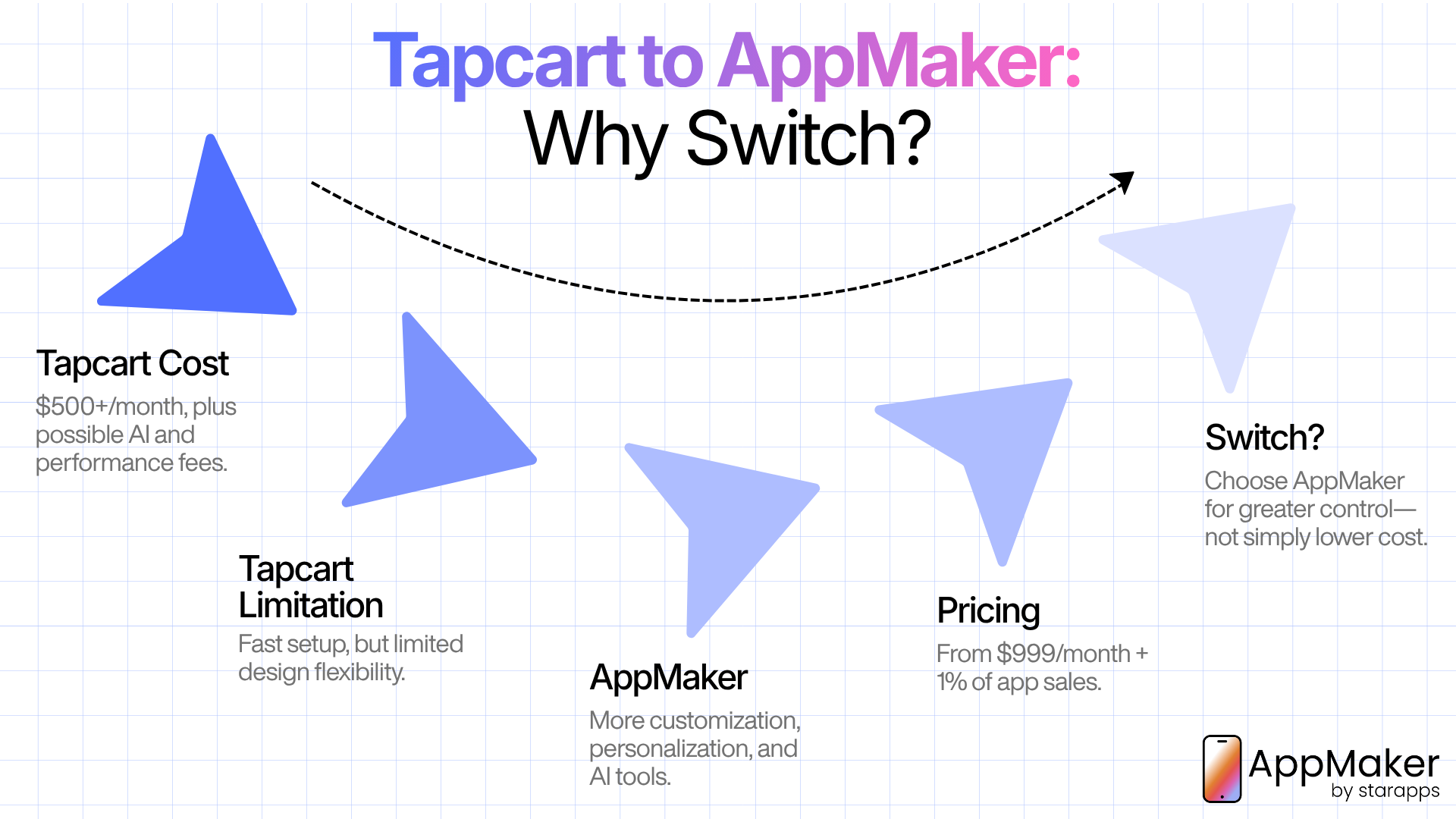
Two forces drive most of these migrations: cost and control. A brand rarely leaves a working app over one feature. It leaves when the monthly bill stops matching the value, or when the design ceiling starts capping what the brand can do on mobile.
How much does Tapcart actually cost in 2026?
This is where you need to be careful, because published Tapcart pricing is genuinely inconsistent across sources, and even secondhand "2026 pricing" articles disagree with each other. Tapcart's entry point has moved to roughly $500 per month, with the AI feature suite sitting behind a separate add-on of about $250 per month, and higher tiers running till $2,850 per month. Tapcart also charges performance-based fees on top of the subscription on some plans, and every plan requires you to hold your own Apple Developer account ($99 per year) and Google Play developer account ($25 one-time).
Because the numbers move and vendors update pricing pages without notice, treat any single figure you read (including this one) as something to confirm on Tapcart's own pricing page before you budget around it. The pattern that holds across sources is the direction of travel: Tapcart's effective cost for a growing brand, once AI and performance fees are included, has climbed, and that climb is what pushes many merchants to re-evaluate.
Why do so many Tapcart apps look alike?
Tapcart is built on a block-based editor. You assemble homepages, collection pages, and product pages from a library of pre-built, drag-and-drop sections. That makes launching fast, which is a real advantage. The trade-off is that apps built this way tend to share a visual family resemblance, because every brand is arranging the same underlying blocks. For a store that has invested heavily in a distinctive web identity, watching that identity flatten into a recognizable template on mobile is a common frustration, and it is often the specific thing that starts a migration conversation.
What does AppMaker offer that changes the calculation?
AppMaker positions itself against templates. Alongside a drag-and-drop studio, it offers code-level building blocks and conditional personalization that a purely block-based system is not architected to match. Its own product set includes Code Blocks for building custom UI and logic, App Conditional Blocks that change what a shopper sees based on Shopify tags and metafields, Eidolon AI that turns a Figma file or store theme into app-ready layouts, and John AI for analytics and campaign insight. AppMaker also supports both Shopify and WooCommerce, which matters if you ever run a store outside Shopify's ecosystem.
AppMaker's own published pricing starts at $999 per month plus 1% of in-app sales for its Growth plan, with an Enterprise plan from $2,000 per month plus 1% that unlocks custom themes, full developer access, custom APIs, and a dedicated account manager. That is a higher entry point than Tapcart's lowest tier, and it is an honest trade to name plainly: you are paying more at the floor in exchange for design control and personalization depth, not for a cheaper monthly line item. Whether that trade makes sense depends entirely on how much your brand relies on a differentiated mobile experience and how much revenue flows through the app. AppMaker's customer base skews toward Indian direct-to-consumer brands, and its Enterprise roster includes names like Supertails, XYXX, and Bombay Shirt Company, which gives a sense of the segment the platform is built for.
The honest version of "should you switch?"
Migrate if your reasons are structural: you have outgrown the design ceiling, you need conditional personalization Tapcart's block system cannot deliver, or you want to run a store outside Shopify that Tapcart can't follow. Do not migrate on price alone unless you have modeled the full cost at your real in-app sales volume, because a revenue-share model can cost more than a flat subscription once app sales grow. Run both models against your projected 12-month numbers, not today's. If the app is a minor channel and the current setup works, the safest move may be no move at all.
What Actually Transfers, What You Rebuild, And What You Verify
Getting this distinction right is the whole game. Here it is in detail.
What transfers automatically
Your Shopify catalog data is the easy part. Both Tapcart and AppMaker read products, collections, variants, inventory, and pricing live from Shopify through its API. When you connect AppMaker, that data populates on its own. The same is true of customer accounts, order history, and saved payment details, all of which live in Shopify and are never touched by swapping app builders. There is no export, no CSV, no risk of losing orders. This is why a mobile app migration is far less dangerous than, say, a full replatform.
What you rebuild by hand
Everything you created inside Tapcart's editor is Tapcart's, not Shopify's, and none of it comes across. That includes your app's home screen layout, navigation structure, custom banners, timed promotions, static content pages, and any Tapcart-specific block arrangements. You also rebuild every push notification automation, because automation logic does not transfer between platforms. More on that below, because it is the step brands most often botch.
What you have to verify before you commit
Two things need checking rather than assuming. First, your integrations: AppMaker's integration library is real but narrower than Tapcart's broader catalog, so confirm that each specific tool you depend on (your loyalty app, your subscription app, your reviews app, your email platform) has a supported AppMaker connection before you finish the switch. Second, your deep links: any deep link baked into email flows, SMS, or ads points to a specific in-app destination, and that link structure may differ in AppMaker. Catalog every deep link in active use and plan to remap and re-test each one.
Before You Start: The Preparation Phase
A rushed migration is how brands end up with dead push segments or a week of a broken app during peak season. The prep work matters as much as the technical steps.
Audit your current Tapcart app
Before you touch AppMaker, document what your current app does that you cannot afford to lose. Walk through the app and capture:
- Every active push notification automation and segment (abandoned cart, welcome series, win-back, browse abandonment, back-in-stock, and any custom flows)
- Every custom deep link used in email, SMS, or paid campaigns
- Every third-party integration currently connected (loyalty, subscriptions, reviews, email or SMS platform, any niche apps)
- Screenshots of your homepage, navigation, collection pages, and key product page layouts
- Any static pages, custom banners, or timed promotions built inside Tapcart
Those screenshots become your build reference in AppMaker Studio so you rebuild from a real record rather than from memory.
Confirm the technical details that protect your install base
This is the part the marketing guides skip, and it is the part that actually determines whether your existing customers survive the switch. Before you build anything, confirm three things about how your app is published:
- Bundle ID (iOS) and package name (Android): Your app store listing, reviews, ratings, and installed base stay intact only if the new AppMaker build ships under the same bundle ID and package name. Ship under a new identifier and the stores treat it as a brand-new app, which means a fresh listing, zero reviews, and every existing customer stranded on the old app.
- Signing keys and store account ownership: You (not the app builder) should own your Apple Developer account and Google Play Console account, and you need continued access to the signing keys used for the current app. Android in particular will reject an update signed with a different key. Confirm you can sign the new build correctly before you start.
- Push notification setup: Push permission on both iOS and Android is granted to your app (its bundle ID), not to Tapcart's SDK. That is good news: opted-in users don't have to re-approve notifications. But the practical consequence is that your reachable audience rebuilds as devices come online with the updated app, typically reaching the large majority of active users over two to three weeks. Plan your first big push campaigns around that ramp rather than expecting full reach on day one.
If any of these are unclear, get answers from your team or from AppMaker's onboarding support before building. Sorting them out afterward is painful.
Time the migration around your Tapcart contract and your sales calendar
Two timing rules. First, avoid your highest-traffic sales windows. An app store review delay or a last-minute bug during a major promotion is far more costly than the same hiccup in a quiet week. Second, check your Tapcart contract. Multiple merchants report being on 12-month Tapcart terms, and Tapcart's own terms of use describe subscriptions that renew automatically unless you cancel ahead of the renewal date. Migrating mid-contract can leave you paying two vendors at once, so time the switch around your renewal date and confirm the exact cancellation window in your agreement before you sign anything new.
Back up your assets
Export your product images, banner graphics, and any custom copy from Tapcart's static content blocks. None of it transfers automatically. Your Shopify product, collection, and customer data does not need manual backup because both platforms sync it live, but anything you authored inside Tapcart's editor needs a saved copy so you can recreate it.
The Step-By-Step Migration Process
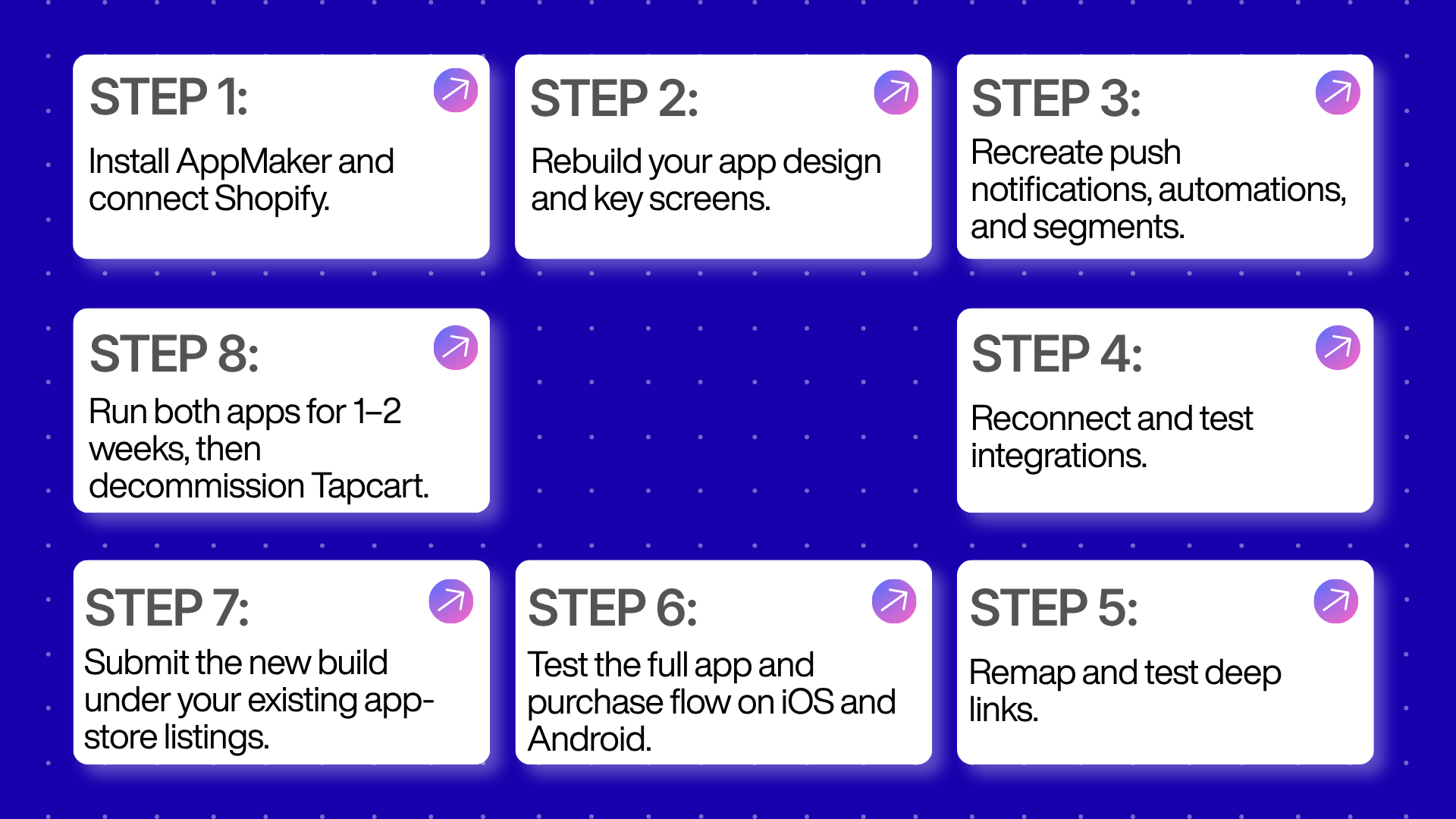
With preparation done, the build follows a predictable sequence. Most standard rebuilds don't need a developer, though AppMaker's higher tiers offer code-level support for complex work.
Step 1: Install AppMaker and connect your Shopify store
Install AppMaker and connect it to your store. This pulls your catalog, collections, and customer data automatically. Crucially, it runs in parallel with your live Tapcart app and does not disrupt it. Installing a second app builder does not affect your Tapcart integration until you actively decide to cut over, which is what makes a safe parallel transition possible.
Step 2: Rebuild your app design in AppMaker Studio
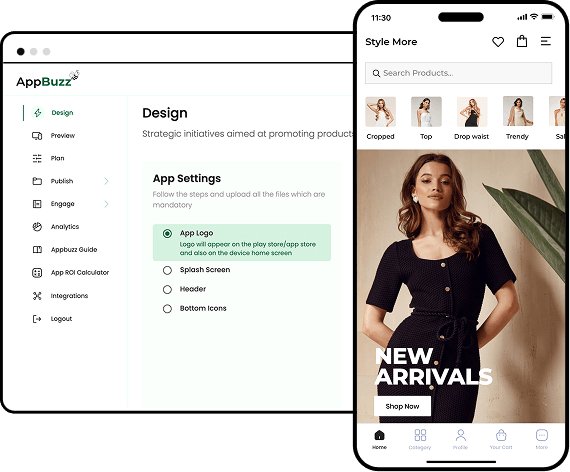
This is the most time-intensive step, and it is where AppMaker's flexibility earns its cost. Using your audit screenshots, rebuild your homepage, navigation, and key page templates in AppMaker Studio, the drag-and-drop editor with real-time preview. Where Tapcart hands you fixed blocks, AppMaker's Conditional Blocks let you personalize content by customer segment using Shopify tags and metafields, so different shoppers can see different banners, collections, or promotions automatically. Brands with more complex design needs can use Code Blocks to build layouts outside the standard template library entirely, and Eidolon AI can turn a Figma file or your existing store theme into an app-ready layout to shorten the rebuild.
Don't just clone your Tapcart design pixel for pixel. Migration is the natural moment to fix the layout compromises the block system forced on you, since you now have room to do so.
Step 3: Rebuild your push notification automations and segments
Push notifications are usually the highest-converting feature of any Shopify mobile app, and they are the single most underestimated piece of a migration. Automation logic does not transfer. List every automated trigger running in Tapcart (abandoned cart, welcome series, win-back, browse abandonment, back-in-stock) and rebuild each one in AppMaker, along with the segments that feed them.
Two nuances that are easy to miss:
- Your opted-in audience carries over, your automations do not. Because permission lives at the app level, subscribers aren't lost, but every flow that targets them has to be recreated from scratch.
- Reach ramps over two to three weeks. As devices update to the AppMaker build, they re-register with AppMaker's push service. Time-sensitive campaigns in the first fortnight will reach a growing share of your base rather than all of it at once.
Rebuild this carefully, not quickly. A gap here silently costs revenue, and it's the most common source of a post-migration dip.
Step 4: Reconnect and verify your integrations
Reconnect your tools (email or SMS platform, loyalty, subscriptions, reviews) inside AppMaker's integration settings. Then verify each one actually works end to end, because AppMaker's integration ecosystem is narrower than Tapcart's larger library. Check the niche apps especially. This is a place where "we'll assume it's supported" turns into an unpleasant mid-migration surprise. AppMaker's integrations directory is the fastest way to confirm a specific tool is covered before you cut over.
Step 5: Remap and test your deep links
Every deep link in your marketing (email flows, SMS, paid ads) points to a specific in-app screen. AppMaker's link structure may differ from Tapcart's, so map each active deep link to its AppMaker equivalent and test that it opens the right destination on both iOS and Android. Broken deep links silently degrade every campaign that relies on them, and they are easy to forget because nothing "looks" wrong in the app itself.
Step 6: Test everything before you submit
Test the full purchase flow on both iOS and Android: browsing, search and filtering, add to cart, checkout, account login, order history, and any personalized content tied to customer tags. Send test push notifications to a small internal segment to confirm automations fire and deep-link correctly. This step catches the large majority of issues before they reach a real customer. Skipping it is the most common cause of a rocky launch.
Step 7: Submit under your existing app store listing
Once testing passes, submit the AppMaker build through your existing App Store and Google Play listings, under the same bundle ID and package name you confirmed in prep. Because you are updating an existing app rather than launching a new one, your store URL, reviews, ratings, and install base carry over, and customers receive it as a normal update rather than a new-download prompt.
Build review time into your schedule. Apple's App Review typically takes a day or two but can run longer, and app updates still go through a real review even though it is usually faster than a first submission. Google Play review is often quicker but is not instant, and review times can extend for newer developer accounts. Pad your timeline for at least one round of revisions in case Apple flags something on the first pass.
Step 8: Run both apps in parallel, then decommission Tapcart
Do not do a hard cutover. Keep Tapcart live for one to two weeks after the AppMaker build ships, monitoring for issues as your install base updates and your push audience re-registers. This overlap costs a bit in doubled subscriptions but removes the risk of stranding customers on a broken experience. Once you've confirmed the AppMaker app is stable, push reach has ramped, integrations are firing, and analytics are tracking, decommission Tapcart, and time that cancellation to your contract's renewal window.
Full Migration Checklist
Use this as your working document. It maps to the phases above.
Before you build
- [ ] Audit and screenshot the entire current app (home, nav, collections, PDPs, static pages)
- [ ] List every push automation and segment
- [ ] List every active deep link in email, SMS, and ads
- [ ] List every connected integration
- [ ] Confirm bundle ID (iOS) and package name (Android) can be preserved
- [ ] Confirm you own the Apple and Google developer accounts and signing keys
- [ ] Export product images, banners, and custom copy from Tapcart
- [ ] Check your Tapcart contract renewal and cancellation window
- [ ] Schedule the migration outside peak sales periods
During the build
- [ ] Install AppMaker and connect Shopify
- [ ] Rebuild homepage, navigation, and key templates in AppMaker Studio
- [ ] Recreate every push automation and segment
- [ ] Reconnect and end-to-end test every integration
- [ ] Remap and test every deep link on iOS and Android
Before you submit
- [ ] Test the full purchase flow on iOS and Android
- [ ] Test login, order history, and personalized blocks
- [ ] Send internal test push notifications and confirm deep links
- [ ] Confirm the build uses the correct bundle ID, package name, and signing key
Launch and after
- [ ] Submit under the existing App Store and Google Play listings
- [ ] Allow for Apple and Google review time plus one revision round
- [ ] Run Tapcart and AppMaker in parallel for one to two weeks
- [ ] Monitor push reach as it ramps over two to three weeks
- [ ] Verify analytics and conversion tracking against your Tapcart baseline
- [ ] Cancel Tapcart on your renewal date once AppMaker is stable
How Long Does A Tapcart-To-AppMaker Migration Take?
Most migrations take two to four weeks end to end. The variable is how customized your existing app is.
- Simple apps (standard layout, few automations, minimal custom content): roughly one to two weeks.
- Moderately customized apps (several push automations, multiple integrations, some custom design): two to three weeks.
- Highly customized or higher-tier apps (custom code, complex personalization, many integrations): three to five weeks, especially when custom code blocks are involved.
App store review adds a few days on top of your internal build timeline. Budget for one revision round, because a first Apple submission that gets flagged is common and easily costs you an extra cycle. And remember the post-launch tail: push reach and full analytics comparison take another two to three weeks to settle as devices update.
What Happens To Your Customers And Your Data?
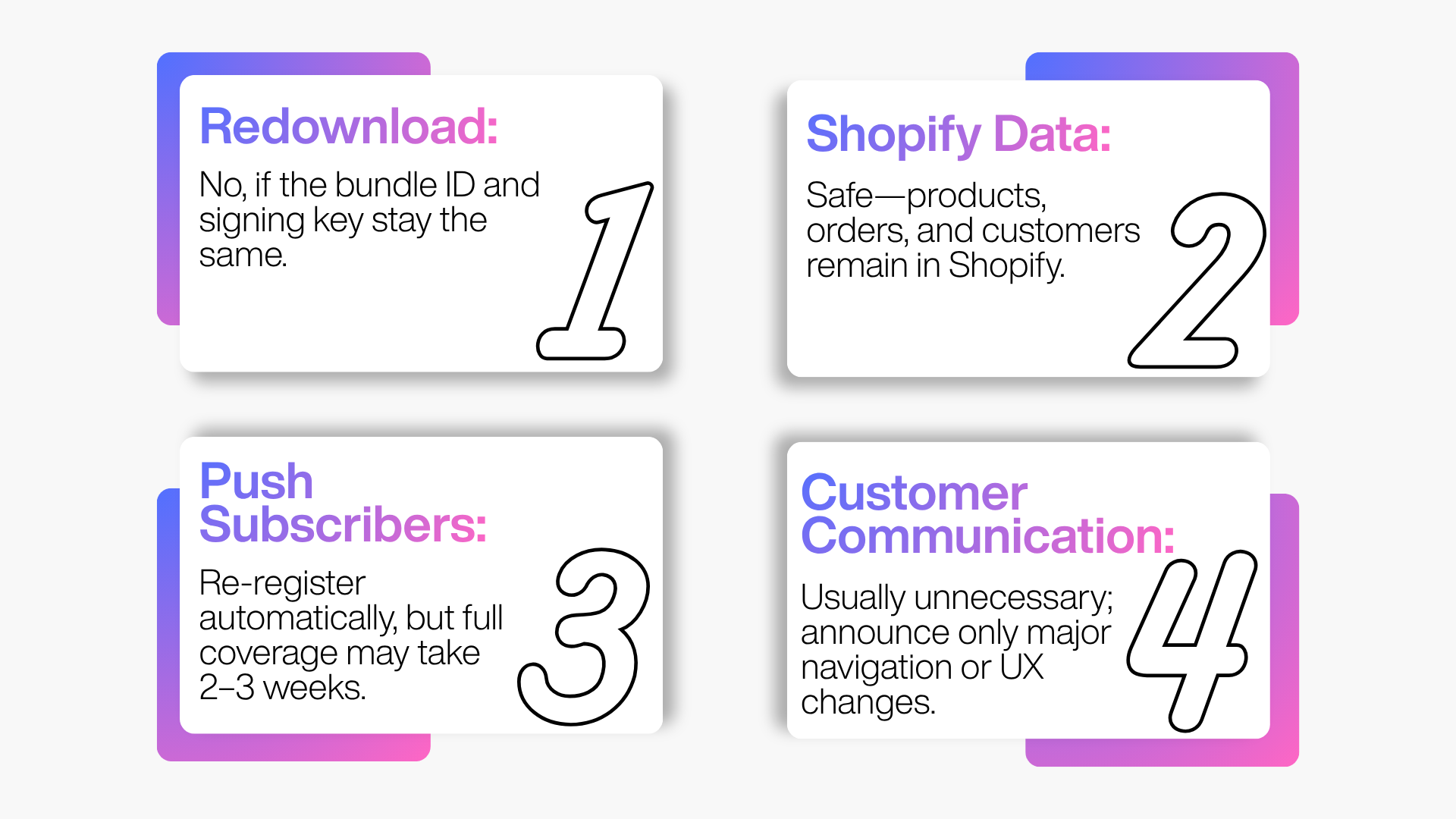
This is the question most brands worry about first, and the reassuring answer is that very little changes for the customer when the migration is handled correctly.
Do customers need to redownload the app?
No, as long as you keep the same bundle ID and signing key. Because you're updating an existing listing rather than launching a new app, customers receive the AppMaker build through the normal auto-update process, the same way any app update reaches a phone. There is no reinstall and no loss of account, order history, or saved payment details, because all of that lives in Shopify. The one scenario where customers would need to redownload is if the app is republished under a new bundle ID, which is exactly the mistake the prep checklist exists to prevent.
Does migrating affect my Shopify store data?
No. Products, collections, orders, and customers all live in Shopify and sync live to whichever app builder is connected. Swapping builders never puts that data at risk. This is the core reason a mobile app migration is lower-stakes than most people assume before they start.
What happens to my push subscribers?
Your opted-in subscribers are not lost. Notification permission belongs to your app, so as customers update to the AppMaker build, their devices re-register with AppMaker's push service and become reachable again, no re-prompt required. The nuance is timing: full reach rebuilds over two to three weeks as the update rolls out, so plan your first campaigns accordingly rather than expecting complete coverage on launch day.
How should you communicate the switch to customers?
Most brands don't need to announce a platform migration at all, because customers simply experience a refreshed app update. If your redesign changes navigation meaningfully, a short in-app message or a "what's new" push smooths the adjustment, especially for loyal customers with muscle memory for the old layout. Silence is fine for a light redesign; a heads-up is worth it for a heavy one.
The Biggest Mistakes Brands Make During This Migration
A handful of avoidable errors account for most of the pain merchants report.
- Publishing under a new bundle ID: This is the most damaging mistake and the least discussed. A new identifier means a new listing, lost reviews, and every existing user stranded. Confirm identifier and signing-key continuity before you build anything.
- Treating push rebuild as copy-paste: Automations don't transfer. Underestimating this step is the leading cause of a post-migration revenue dip. Rebuild every flow and segment deliberately.
- Assuming every integration has an AppMaker equivalent: Verify each tool, especially niche loyalty and subscription apps, before you cut over.
- Forgetting deep links: Broken links quietly degrade every campaign that uses them, and nothing in the app looks obviously wrong.
- Migrating during peak season: Review delays and last-minute bugs are far costlier during a promotion than in a quiet week.
- Doing a hard cutover: Skipping the parallel-run window removes your safety net if something breaks after submission.
- Ignoring contract timing: Migrating mid-contract on Tapcart's typical annual term means paying two vendors longer than necessary.
- Expecting full push reach on day one: Reach ramps over two to three weeks; plan launch campaigns around the ramp.
Final Thoughts
A Tapcart-to-AppMaker migration isn't a data overhaul, it's a controlled rebuild. Your Shopify data never moves, your app store listing stays intact, and your customers barely notice the switch happening behind the scenes, provided you protect the three things that actually carry risk: the bundle ID, the push audience, and the automations that drive revenue.
The brands that migrate smoothly treat it as a real project rather than a weekend task. They audit what they have, confirm the identifier and signing-key details before building, rebuild push flows deliberately instead of as an afterthought, verify every integration and deep link, and run both apps in parallel long enough to catch problems before fully committing. Get those fundamentals right and the switch is far less risky than it looks from the outside. What you gain is an app that can personalize by segment, look like your brand instead of a shared template, and grow custom functionality as you scale rather than hitting a fixed ceiling.
Where To Get Help With Your Migration
You don't have to plan this alone. AppMaker offers guided onboarding on its higher-tier plans, and its pricing page sets out which tier includes migration support versus self-serve setup.
Before you commit, the integrations directory is the quickest way to confirm the specific tools you rely on are supported, and you can talk to AppMaker's team about a scoped migration plan for your store.
For the platform-side facts that this migration depends on, go to the primary sources directly: Shopify's mobile commerce documentation, Apple's App Review guidelines, and Google Play's launch and review documentation.
Frequently Asked Questions
How long does it take to migrate from Tapcart to AppMaker?
Most migrations take two to four weeks, depending on how customized your Tapcart app is and how many push automations and integrations need rebuilding. Highly customized apps can take three to five weeks, and app store review adds a few days on top.
Will my customers need to redownload the app after migrating?
No, as long as you publish the AppMaker build under the same bundle ID and signing key as your current app. Customers receive it as a normal update, with no loss of account, order history, or saved payment details, all of which live in Shopify.
Does migrating from Tapcart affect my Shopify store data?
No. Products, collections, inventory, orders, and customers all live in Shopify and sync live to whichever app builder is connected, so your store data is never at risk during the switch.
What happens to my Tapcart push notification automations?
They don't transfer and must be rebuilt manually in AppMaker. Your opted-in subscribers carry over as devices update, because permission belongs to your app, but every automation and segment has to be recreated. This is the most commonly underestimated step.
Do my push subscribers get lost when I switch?
No. Notification permission is granted to your app, not to the app builder's SDK, so subscribers re-register with AppMaker as they update. Full reach rebuilds over roughly two to three weeks as the update rolls out.
Can I run Tapcart and AppMaker at the same time during migration?
Yes, and it's the recommended approach. Installing AppMaker doesn't disturb your live Tapcart app, so you can build and test in parallel and keep both live for one to two weeks before decommissioning Tapcart.
Is AppMaker more expensive than Tapcart?
AppMaker's published pricing starts at $999 per month plus 1% of in-app sales (Growth), rising to from $2,000 per month plus 1% (Enterprise), which is a higher entry point than Tapcart's lowest tier. The gap narrows once you add Tapcart's AI add-on and performance fees, but AppMaker is generally the higher floor in exchange for more design control. Model both at your real in-app sales volume before deciding.
Do I need a developer to migrate from Tapcart to AppMaker?
Not for most standard rebuilds, since AppMaker Studio is a drag-and-drop editor. A developer becomes useful only if you're using custom Code Blocks or higher-tier API access for bespoke functionality.
What's the best time to migrate from Tapcart?
Outside your peak sales periods, and timed around your Tapcart contract renewal date. Merchants report annual Tapcart terms that renew automatically, so migrating mid-contract can mean paying for two platforms at once.
Does AppMaker support all the same integrations as Tapcart?
Not entirely. AppMaker's integration library is narrower than Tapcart's, so check AppMaker's integrations directory to confirm your specific tools, especially niche loyalty and subscription apps, before you migrate.
Will I lose my app store reviews and ratings?
No, as long as you update the existing listing under the same bundle ID rather than publishing a new app. Reviews, ratings, and your install base all stay attached to the existing listing.
What about deep links in my email and SMS campaigns?
Deep links point to specific in-app screens and don't transfer automatically. Catalog every active deep link, remap it to AppMaker's link structure, and test each one on both iOS and Android before launch.