




























Mobile app native vs hybrid is one of the most important decisions businesses face when building a mobile application in 2026.
According to Gartner, by 2026, 40% of every enterprise application will include some form of AI assistant, showing how rapidly mobile and enterprise app expectations are evolving and pushing developers to rethink traditional approaches like native vs hybrid development.
In this guide, we’ll break down the difference between native and hybrid mobile apps, compare them with web apps, and help you choose the right development approach based on your business goals, budget, and technical requirements.
Key Takeaways
- Native mobile apps offer better performance, user experience, security, and long-term scalability compared to hybrid apps.
- Hybrid mobile apps enable faster launches and lower upfront costs, making them suitable for MVPs and early-stage use cases.
- The key differences between mobile app native vs hybrid lie in performance, UI/UX quality, access to device features, and long-term ROI.
- Choosing the right approach depends on your business goals, budget, and growth plans, not just development speed.
- No-code platforms like Appmaker enable Shopify brands to launch fully native iOS and Android apps without development complexity.
What Is a Native Mobile App?
A native mobile app is an application developed specifically for a single operating system, such as iOS or Android. These apps are built using platform-specific programming languages and tools, including Swift or Objective-C for iOS and Kotlin or Java for Android.
Because native apps are designed exclusively for one platform, they can directly access device hardware such as the camera, GPS, microphone, and sensors. This tight integration allows native apps to deliver high performance, smooth animations, and a superior user experience.
Examples of native mobile apps include WhatsApp, Spotify, Google Maps, Snapchat, and Apple Pay, all of which rely heavily on device features and performance optimization.
What Is a Hybrid Mobile App?
A hybrid mobile app combines elements of both native and web applications. Instead of building separate apps for iOS and Android, developers create a single codebase that runs across multiple platforms.
Hybrid apps are typically built using web technologies like HTML, CSS, and JavaScript, wrapped inside a native container. Popular hybrid app development frameworks include React Native, Flutter, and Ionic.
Examples of hybrid apps include Instagram, Uber, Airbnb, Twitter (X), and Amazon.
This approach allows businesses to launch apps faster and at a lower cost while still being available on both major app stores. Hybrid apps are especially popular among startups and companies looking to validate ideas quickly.
Native vs Web vs Hybrid Mobile Apps
To fully understand your options, it’s important to compare native vs web vs hybrid mobile apps.
- Web Apps run in a mobile browser and don’t need to be installed. They’re inexpensive but limited in performance and offline capabilities.
- Native Apps are platform-specific and deliver the best speed, responsiveness, and access to device features.
- Hybrid Apps sit in the middle, offering cross-platform support with near-native performance for most use cases.
If your app requires heavy animations, advanced features, or offline functionality, native development is usually the better choice. If speed and budget matter more, hybrid or web solutions may be sufficient.
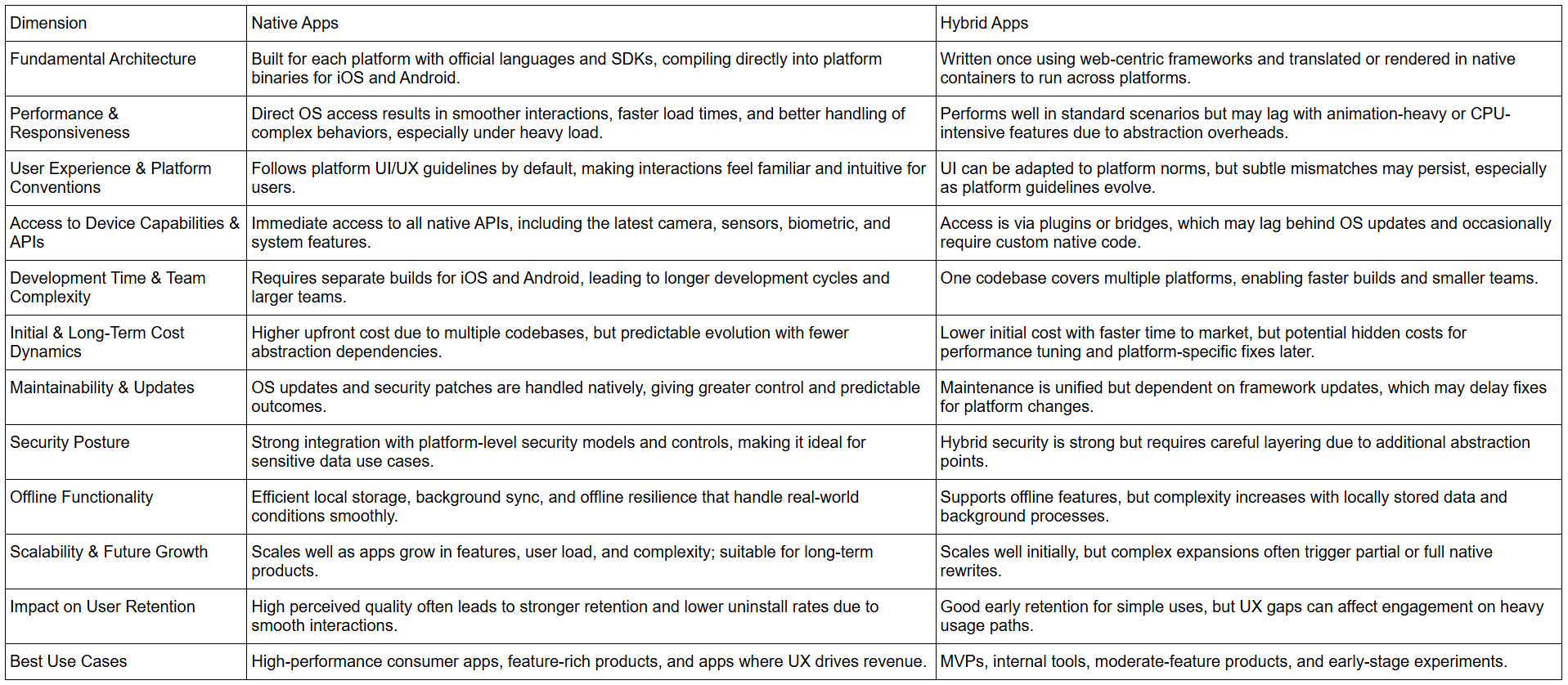
Mobile App Native vs Hybrid: 10 Core Differences That Matter
Choosing between native and hybrid apps is not just a technical decision; it directly impacts cost, performance, scalability, and time-to-market.
The comparison below focuses on factors that influence business outcomes, helping leaders evaluate trade-offs beyond development preferences.
Why This Choice Matters for Your Business
.jpg)
Choosing the right app type impacts:
- User experience: Faster, smoother apps increase retention.
- Development cost & timeline: Multi-platform solutions can save time, but may require compromises.
- Long-term scalability: Future updates and new features may be easier or harder depending on your app type.
Understanding these factors helps business owners make informed decisions that align with their growth strategy.
For Shopify brands that want native performance without managing separate iOS and Android builds, platforms like Appmaker offer a practical middle ground, combining native output with faster execution. Explore Now.
Pros and Cons of Native Mobile Apps
Native mobile apps are built specifically for a single platform, such as iOS or Android. This approach prioritizes performance, reliability, and user experience, which is why it’s often chosen for high-impact, customer-facing applications.
Pros of Native Mobile Apps
- High performance and speedNative apps run directly on the operating system, resulting in faster load times, smoother animations, and better responsiveness.
- Superior user experience (UI/UX)Native apps follow platform-specific design guidelines, making them feel intuitive and familiar to users.
- Full access to device featuresCameras, GPS, biometrics, sensors, and new OS features are fully supported without delays.
- Stronger securityBuilt-in platform security features make native apps ideal for handling sensitive user data and payments.
- Better scalability for long-term growthNative apps handle complex logic, high traffic, and advanced personalization more efficiently.
Cons of Native Mobile Apps
- Higher development costSeparate development is required for iOS and Android.
- Longer time to marketBuilding and maintaining multiple codebases increases development timelines.
- Higher maintenance effortUpdates and fixes must be implemented separately for each platform.
Pros and Cons of Hybrid Mobile Apps
Hybrid mobile apps use a single codebase to run across multiple platforms. This approach focuses on speed, cost efficiency, and cross-platform consistency.
Pros of Hybrid Mobile Apps
- Faster development and launchA shared codebase allows teams to release apps more quickly across platforms.
- Lower upfront costHybrid development typically requires fewer resources than native development.
- Easier maintenanceUpdates can be deployed simultaneously across iOS and Android.
- Broader developer accessibilityWeb-based technologies make it easier to find and scale development teams.
- Ideal for MVPs and startupsHybrid apps are well-suited for validating ideas and entering the market quickly.
Cons of Hybrid Mobile Apps
- Performance limitationsHybrid apps may struggle with complex animations, real-time updates, or heavy data processing.
- Limited access to advanced device featuresNew or platform-specific OS features may not be immediately supported.
- Dependency on frameworks and pluginsApp stability and security rely heavily on third-party tools and updates.
- UX inconsistenciesInterfaces may feel less native compared to platform-specific apps.
Mobile App Native vs Hybrid: Development Costs & ROI
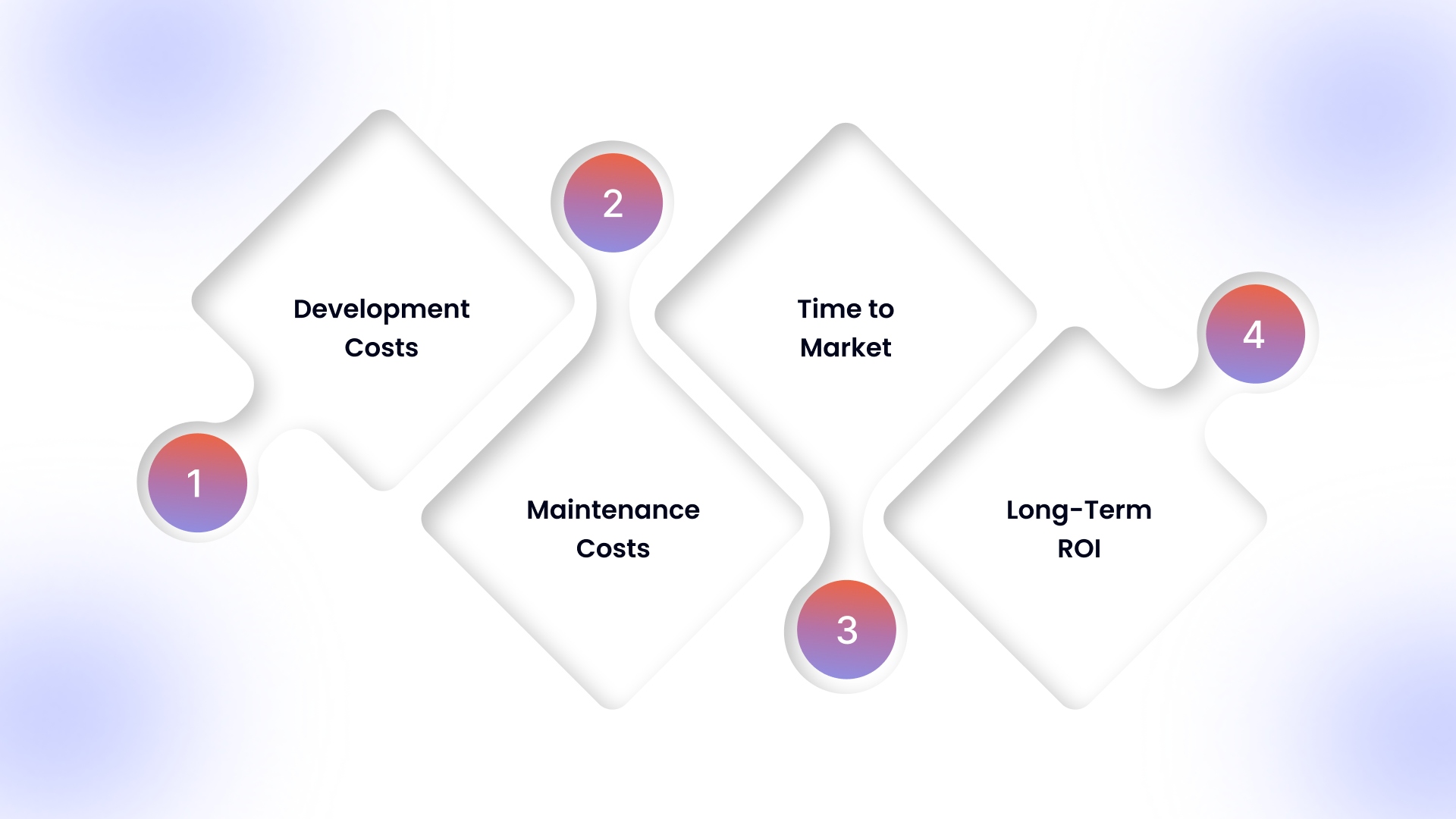
Before comparing exact figures, it’s important to understand what influences the cost of mobile apps:
- Development Costs: Native apps require separate builds for iOS and Android, while hybrid apps share a single codebase.
- Maintenance Costs: Native apps must be updated and maintained individually per platform, whereas hybrid apps benefit from unified updates.
- Time to Market: Hybrid apps typically reach the market faster because a single codebase is used across platforms. Native apps take longer since iOS and Android must be built, tested, and maintained separately.Faster deployment with hybrid apps reduces opportunity cost and allows businesses to validate ROI sooner, while native apps trade speed for deeper performance optimization.
- Long-Term ROI: Consider user retention, performance, and scalability; a higher upfront investment in native apps may yield better long-term returns for complex or high-traffic apps.
With this context, the detailed cost comparison table is much easier to interpret.
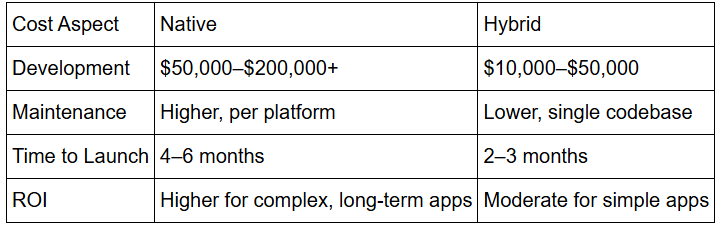
For Shopify brands, no-code native platforms like Appmaker change this equation by delivering true native apps at hybrid-like timelines and costs, without long-term performance trade-offs.
When to Choose Native Apps?
Native apps are ideal if you require:
- High-performance applications (e.g., gaming, AR/VR apps)
- Full access to device-specific features
- Superior UI/UX tailored to platform conventions
- Complex offline functionality
For example, large e-commerce brands needing seamless checkout, personalized push notifications, and loyalty program integration benefit from native apps.
When to Choose Hybrid Apps?
Hybrid apps are suitable if you need:
- A fast, cross-platform solution
- Lower development costs and shorter timelines
- Moderate access to device features
- Consistent experience across iOS and Android
Startups, small-to-medium businesses, or brands expanding quickly across multiple platforms often choose hybrid apps for speed and efficiency.
Also Read: 10 Smart Ways to Promote Your Shopify Store in 2026
How Appmaker Helps You Build Native Mobile Apps Without the Complexity
Choosing between native vs hybrid mobile apps doesn’t have to mean hiring developers or managing multiple codebases. Appmaker helps Shopify brands launch fully native iOS and Android apps using a no-code approach designed for scale.
We offer no-code solutions, enabling businesses to create apps with minimal technical knowledge. Here are some of the key features:
- Eidolon AI: An AI-powered tool that allows merchants to create fully custom mobile app designs by uploading screenshots or Figma files. This tool helps convert static images into actionable code that can be reused throughout the app.
- Appmaker Studio: A drag-and-drop builder that enables merchants to create fully branded mobile apps without needing coding experience. It provides flexibility, allowing for easy additions of banners, videos, and product displays.
- Push Notifications: Appmaker enables merchants to send push notifications to customers based on actions like sales, promotions, or cart reminders, enhancing engagement.
- Code Blocks: Allows for the creation of reusable blocks of code that can be applied throughout the app, making the app-building process faster and more flexible.
- Conditional Blocks: This feature allows merchants to implement custom conditions on their app’s display elements, ensuring a tailored experience for different customers.
- Pre-built Extensions & Plugins: Offers a marketplace of pre-built extensions, such as sticky carts, countdown timers, loyalty modules, and more.
- Custom Code & Developer Access: Allows developers to add custom functionality, build subscription models, create loyalty checkouts, and integrate custom features.
- Multi-Language Support: Supports building mobile apps in different languages to cater to a diverse, global audience.
- Custom App Building for Other Industries: Apart from e-commerce, Appmaker offers custom app building for various other industries, including restaurants, real estate, events, salons, healthcare, education, photography, entertainment, and travel.
- Integration Support: Integrates easily with major e-commerce platforms and other services like CRM, inventory systems, payment gateways, and more.
For growing brands, Appmaker offers the benefits of native apps with the flexibility modern e-commerce teams need.
Conclusion
Choosing between a mobile app native vs hybrid plays a critical role in how your app performs, scales, and engages users over time. By understanding the key differences, pros and cons, and long-term impact of each approach, Shopify brands can make informed decisions that support both growth and customer experience.
With Appmaker, you don’t have to compromise between performance and simplicity. AppMaker enables you to launch fully native iOS and Android apps for your Shopify store without development complexity, while offering the flexibility to scale, personalize, and optimize engagement through built-in tools.
If you’re looking to turn your Shopify store into a high-performing native mobile app and drive stronger retention and conversions, reach out to Appmaker today to explore the right solution for your business.
FAQs
Is a native mobile app always better than a hybrid app for Shopify stores?
Not always. Native apps are better for performance and advanced features, while hybrid or no-code native solutions work well for faster launches. The right choice depends on your store’s growth stage and mobile goals.
Can no-code platforms build real native mobile apps?
Yes. Modern no-code platforms like Appmaker, built on technologies like React Native, compile into true native apps. This allows businesses to get native performance without traditional development complexity.
How does the native vs hybrid app choice impact mobile conversion rates?
Native apps usually load faster and provide smoother user experiences. These factors reduce friction during browsing and checkout, which can positively impact conversions and retention.
Do native mobile apps improve customer retention compared to mobile websites?
Yes. Features like push notifications, saved preferences, and offline access help native apps re-engage users more effectively than mobile websites.
Can a business switch from hybrid to native later?
Yes, but it can be costly if not planned early. Choosing a scalable solution from the start helps reduce the need for major rebuilds as the business grows.