




























If you’re running a Shopify store or eCommerce brand, you already know mobile shoppers are where the growth is, but are they shopping your store the way you want them to?
The cold truth is, mobile web often fails to convert the millions of dollars in traffic brands work so hard to attract. A 2024 report states that consumers are 50% more likely to take a revenue-generating action, such as booking or purchasing, through a mobile app than through other digital channels.
That’s why so many growth-minded founders are now asking a more strategic question: “How to make an app for my business” that not just exists on mobile but also converts, retains, and scales revenue.
So if you’re ready to stop leaving money on the table and give your customers the seamless experience they expect in 2026, this guide will walk you step-by-step through building a business-boosting app that doesn’t require you to be a developer.
Quick Snapshot
- Evaluate Business Need: Assess whether a mobile app aligns with your business goals and customer behavior before investing time and resources.
- Cost Considerations: Understand the cost range for app development; simple apps start at $5,000, while complex ones can exceed $150,000.
- Essential Features: Include core features like user login, payment gateways, push notifications, and in-app support to enhance user experience and retention.
- Choose the Right Development Path: For quick deployment and cost-efficiency, consider no-code platforms, while custom development is ideal for businesses needing complex features.
- Avoid Common Pitfalls: Prevent scope creep, budget overruns, and technical issues by setting clear goals, allocating resources wisely, and thoroughly testing the app before launch.
What Is a Business Mobile App?
A business mobile app is a dedicated application designed to help customers interact with your brand directly on their smartphones or tablets. Unlike a mobile website accessed through a browser, a mobile app is installed on a user’s device, allowing faster access, smoother navigation, and more personalized experiences.
When business owners ask how to get an app for their business, they are usually referring to creating an app that enables customers to perform specific actions, such as browsing products, placing orders, booking appointments, or receiving updates, all from a single, branded interface.
With the basics covered, it’s important to understand the inner workings of a mobile app and how it connects your business to customers.
How a Business Mobile App Works
At a basic level, a business app connects three key elements:
- User interface (frontend): What customers see and interact with on their device
- Business systems (backend): Inventory, orders, bookings, or customer data
- Notifications and integrations: Push notifications, payments, maps, or third-party tools
Modern platforms allow businesses to build a mobile app for their business by connecting existing systems, such as an e-commerce store, booking software, or CRM, without building everything from scratch.
Business Mobile App vs Mobile Website
To see why apps can be more effective than websites, let’s compare the key differences between a mobile app and a mobile website.
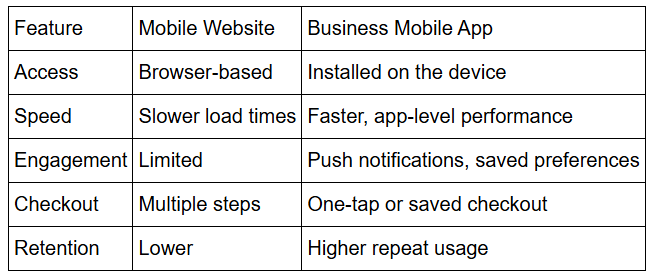
This is why many companies choose to create a mobile app for their business once they see strong mobile traffic but lower conversion or retention rates.
Before jumping into development, consider whether a mobile app truly aligns with your business goals and customer needs.
Should You Build a Mobile App for Your Business?
Not every business needs a mobile app. Before investing time and money, it’s important to evaluate whether an app will truly benefit your business and your customers.
Here are key factors to consider:
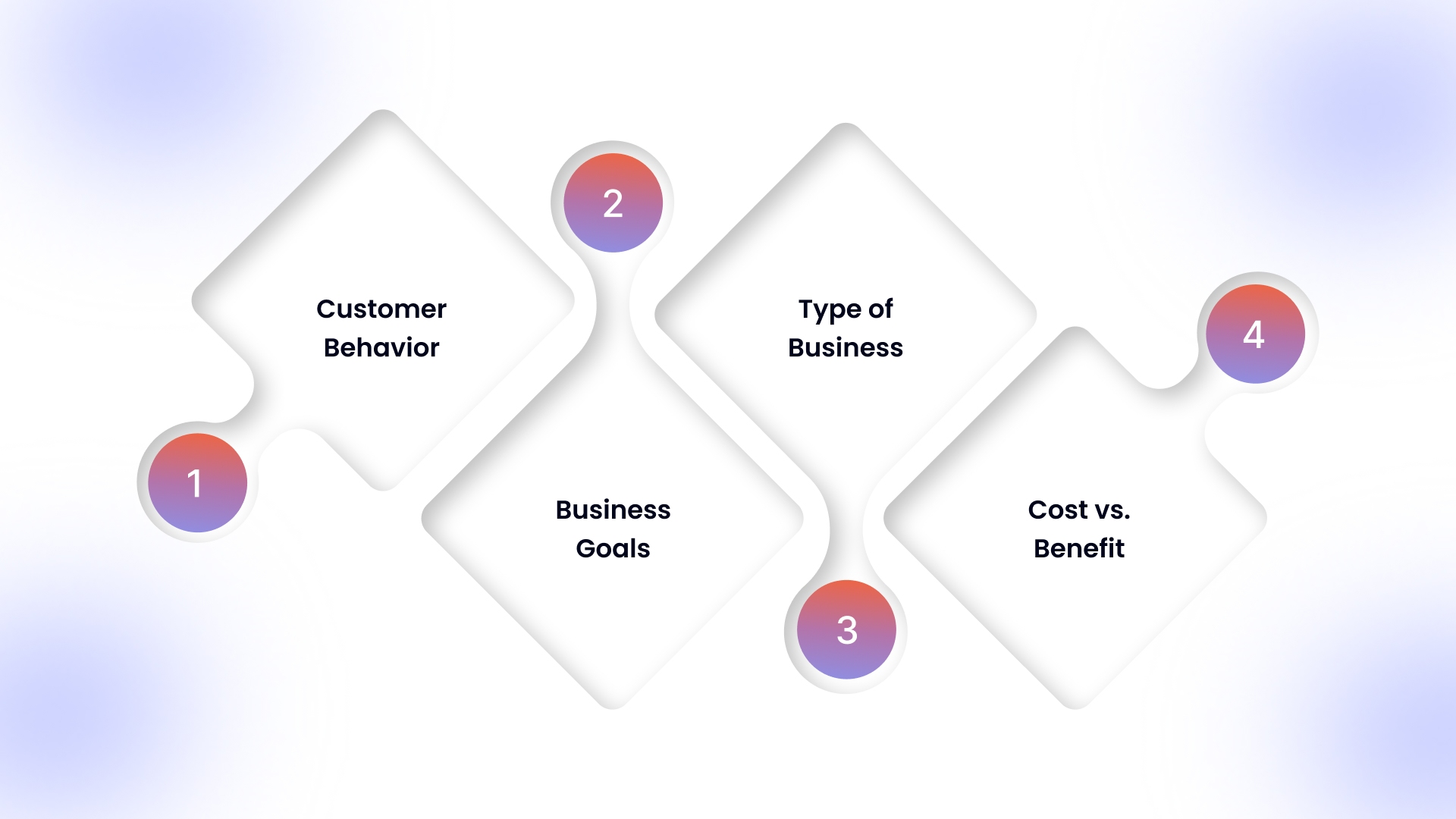
1. Customer Behavior
If your target audience frequently uses mobile devices to interact with your business, whether shopping, booking, or browsing, an app can make their experience faster and more convenient.
Apps are particularly useful for businesses with repeat customers, loyalty programs, or services that require regular interaction.
2. Business Goals
Are you looking to increase sales, improve customer engagement, or build brand loyalty?
Apps provide direct access to users, push notifications, and personalized experiences that websites alone can’t offer.
3. Type of Business
- Retail/E-commerce: Apps can streamline shopping and make repeat purchases easier.
- Service-based businesses: Booking, appointment management, and loyalty programs work well through apps.
- Content-driven businesses: Apps can deliver content like news, tutorials, or exclusive offers more effectively than a mobile website.
4. Cost vs. Benefit
While apps can be expensive to build and maintain, they often provide higher engagement and retention than mobile websites.
If your business relies heavily on recurring interactions or customer retention, the benefits can outweigh the costs.
For example, Starbucks has successfully used its mobile app and Starbucks Rewards loyalty programme to drive frequent repeat visits and deepen customer loyalty.
What fits into an app becomes the next step in creating a mobile app.
Key Features to Include in Your Business App
When building a mobile app for your business, including the right features is critical to provide value to your users and achieve your business goals. Here’s a breakdown of essential features:
1. User Registration and Profile Management
- Allow users to create accounts using email, phone, or social media login.
- Provide profile customization for a personalized experience.
2. Push Notifications
- Send targeted notifications about promotions, updates, or new products.
- Keep users engaged and drive repeat visits.
3. Payment Gateway Integration
- Enable secure and seamless transactions through popular payment methods.
- Support multiple payment options such as credit/debit cards, digital wallets, and net banking.
4. Product or Service Catalog
- Display products or services clearly with images, descriptions, and prices.
- Allow easy navigation through categories and search functionality.
5. In-App Messaging or Chat Support
- Provide real-time customer support to address queries promptly.
- Improves user satisfaction and reduces drop-offs.
6. Reviews and Ratings
- Enable users to leave feedback and rate products/services.
- Builds trust and informs potential customers about quality.
7. Analytics and Reporting
- Track user behavior, app performance, and conversion metrics.
- Helps in making data-driven improvements to the app.
8. Social Sharing Options
- Allow users to share products or content on social media.
- Boosts app visibility and encourages organic growth.
9. Offline Mode (Optional)
- Provides limited functionality even without internet access.
- Useful for content-heavy apps or businesses with frequent mobile users.
Platforms like Appmaker make this approach more accessible by offering built-in features such as push notifications, in-app content updates, and deep linking. Book a demo now.
Including these core features ensures your app is user-friendly, engaging, and aligned with your business objectives. It also increases the likelihood of user retention and positive reviews.
9 Steps to Build a Mobile App for Your Business
.jpg)
Creating a mobile app doesn’t have to be overwhelming. Following a structured process ensures your app meets customer needs, launches on time, and drives business results. Here’s a step-by-step approach:
Step 1: Define Your App’s Purpose and Core Features
- Identify the main problem your app will solve for your customers.
- List 3–5 essential features that directly support this purpose.
- Avoid adding unnecessary features at launch to prevent complexity and delays.
Step 2: Choose the Right Development Approach
- Custom Development: For complex, unique functionality.
- No-Code Platforms: For straightforward apps with fast deployment.
- E-commerce Conversion Tools: If you already have an online store (Shopify, WooCommerce, etc.) and want a native app quickly, no-code app platforms are becoming increasingly popular.
Appmaker, for instance, supports no-code app creation and comes with features like push notifications, seamless store integration, in-app analytics, and customizable layouts. Explore now.
Step 3: Prepare Your Content and Assets
- Gather product images, logos, descriptive text, and promotional content.
- Draft app store descriptions and screenshots in advance to streamline submission.
Step 4: Design Your App for Simplicity
- Focus on mobile-first navigation: users should reach key actions within 2 taps.
- Maintain consistent branding, clear labels, and intuitive menus.
Step 5: Integrate Essential Systems
- Connect payment processors, calendars, or inventory systems.
- Set up analytics tools to track user behavior from day one.
Step 6: Test Thoroughly on Multiple Devices
- Test on various iOS and Android devices, including older models.
- Include team members and a small group of customers to catch usability issues.
Step 7: Prepare for App Store Submission
- Create developer accounts with Apple ($99/year) and Google ($25 one-time).
- Follow platform-specific guidelines to prevent rejections.
- Some no-code platforms handle submission automatically; check if yours does.
Step 8: Launch with a Marketing Strategy
- Promote your app via email, social media, website banners, and in-store messaging.
- Offer early adopter discounts or app-exclusive benefits to encourage downloads.
Step 9: Monitor, Measure, and Iterate
- Track daily active users, conversion rates, and feature usage.
- Collect feedback from users and improve the app iteratively.
- Use analytics to guide which features to enhance or simplify.
Once you’ve understood the steps to create your app, the next question is: what kind of app should you build? Depending on your business goals, audience, and content strategy, several types of apps can help drive engagement, conversions, or productivity.
Also Read: Navigating the Mobile Commerce Landscape: Trends and Insights into 2024
5 Types of Business Apps You Can Create
Building a business app doesn’t have to be complex. With the rise of no-code platforms, companies of all sizes can launch apps quickly and efficiently. Here are five types of business apps you can create, and the kinds of features to look for in a no-code app builder:
.jpg)
1. E-commerce Conversion Apps
For online stores on Shopify, WooCommerce, or similar platforms, a native app can boost sales and repeat purchases. No-code platforms allow you to launch an app quickly, with features such as push notifications, in-app analytics, and seamless store integration, turning your e-commerce site into a mobile-first shopping experience.
2. Content-Heavy Apps
Businesses that publish frequent blogs, videos, or educational content need apps that keep users engaged. No-code builders let you update content in real time, send targeted push notifications, and link directly to specific posts or media, ensuring your audience always has fresh content.
3. Loyalty and Rewards Apps
Apps that reward customers encourage repeat business and brand loyalty. Modern app builders often support loyalty programs, points tracking, tiered rewards, and engagement analytics, helping you understand which incentives drive retention.
4. Booking and Service-Based Apps
Service businesses like salons, clinics, or fitness studios benefit from apps that simplify booking, reminders, and payments. No-code platforms integrate these features seamlessly, improving convenience for customers and reducing administrative work for staff.
5. Internal Productivity Apps
Custom apps for internal workflows, task management, announcements, or project tracking can boost team efficiency. No-code solutions enable secure internal apps with notifications, real-time updates, and reporting tools, keeping teams connected and productive.
Choosing the right type of app is just the beginning. The next important consideration is how long it takes to build your app and what factors influence the timeline, so you can plan your launch effectively.
How Long Does It Take to Make an App for Your Business?
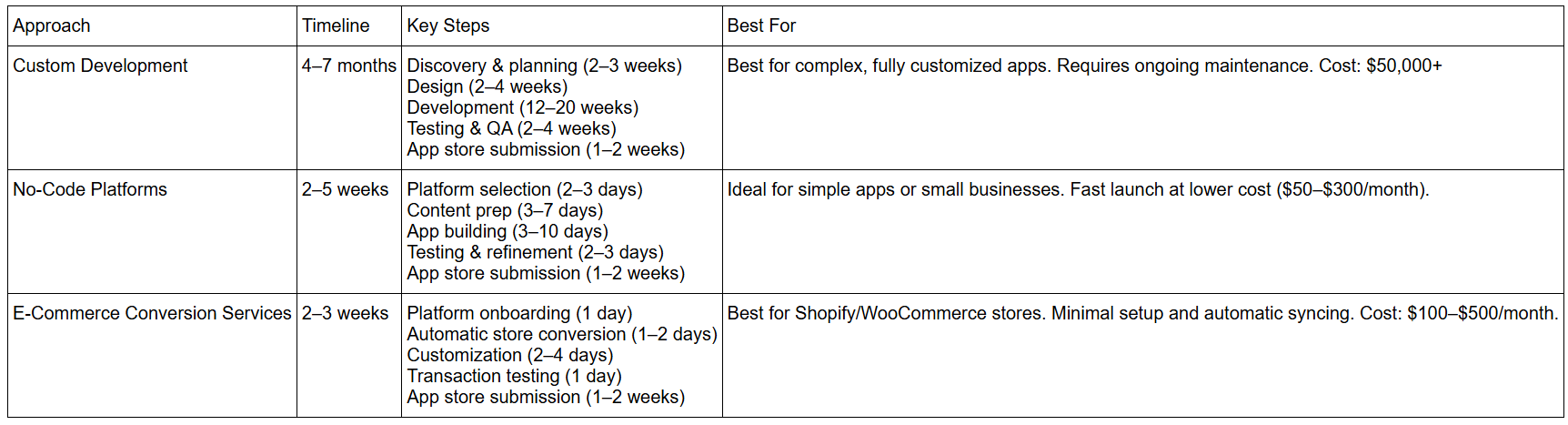
Understanding the timeline for creating a business app helps you plan budgets, marketing campaigns, and seasonal launches effectively. Depending on the approach, the timeline can vary significantly.
Factors That Can Affect Timelines
Even the fastest approaches can experience delays due to:
- Content readiness: Missing images, product info, or copy can stall progress.
- Decision-making speed: Slow approvals from stakeholders add weeks.
- App store reviews: Apple sometimes takes 2–5 days; Google typically takes 1–2 days, but it can vary.
- Seasonal planning: Launching before peak shopping seasons may require starting 3–4 months in advance.
For small to medium businesses, no-code platforms like Appmaker provide the quickest route to launching an app, while custom development should be reserved for complex, highly tailored solutions.
How Much Does It Cost to Make a Mobile App?
The cost of building a mobile app can vary widely depending on its complexity, features, and platform. Understanding the factors that influence pricing will help you plan your budget more effectively.
1. Type of App

2. Platform Choice
- iOS vs Android vs Both: Building for a single platform is cheaper than developing for both. However, targeting both platforms expands your audience and potential ROI.
- Cross-platform development using frameworks like Flutter or React Native can save costs while reaching multiple platforms.
3. Design and User Experience (UX)
- Custom designs, animations, and advanced user interfaces can increase the cost but improve engagement.
- Investing in a seamless UX often leads to higher retention and conversion rates.
4. Features and Integrations
- Features like push notifications, payment gateways, loyalty programs, and in-app analytics can add to development costs.
- Integrations with your existing systems, like Shopify, CRM, or inventory management, also affect pricing.
5. Maintenance and Updates
- The initial development cost is only part of the budget. Apps require ongoing updates, bug fixes, and compatibility adjustments with new OS versions.
- Typical maintenance costs are around 15-20% of the initial development cost per year.
Planning your app strategy carefully ensures your investment aligns with your business goals and customer needs.
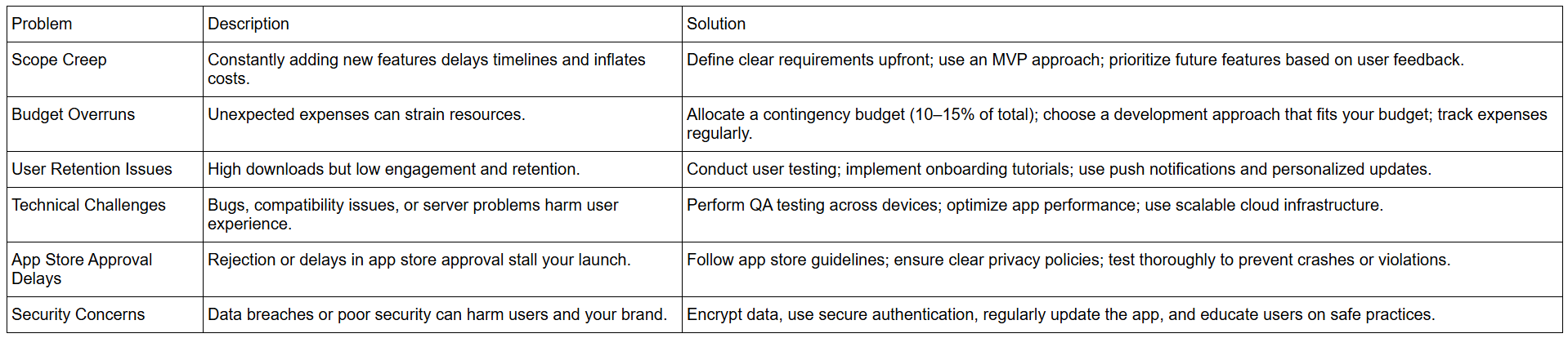
7 Common Mistakes That Derail Your Business App
Even with a clear plan for how to make an app for my business, many projects fail due to avoidable mistakes. Learning from others’ errors can save time, money, and frustration.
After launch, your focus shifts to growth and retention. Here are strategies to keep users engaged and maximize app success.
6 Post-Launch Growth and Marketing Strategies for Your App
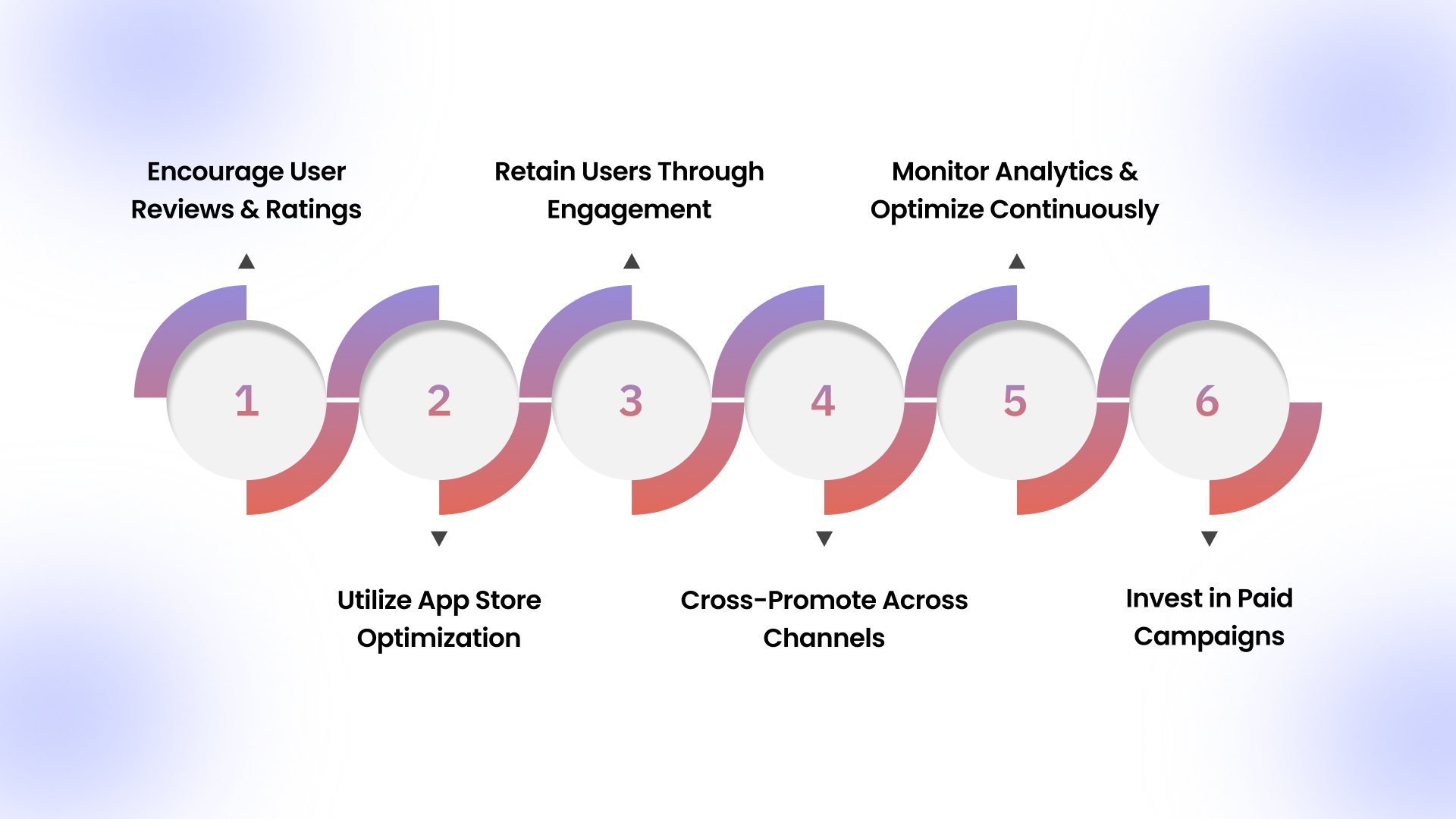
Launching your app is just the beginning. The key to long-term success is growth, user retention, and continuous optimization. Here’s how to ensure your app reaches its full potential:
1. Encourage User Reviews and Ratings
Positive reviews improve visibility in app stores and build trust:
- Prompt satisfied users to leave reviews after completing key actions.
- Respond politely to negative feedback and resolve issues quickly.
- Monitor app store ratings regularly and identify areas for improvement.
2. Utilize App Store Optimization (ASO)
ASO improves your app’s discoverability in stores, similar to SEO for websites:
- Use relevant keywords in the app title, description, and metadata.
- Add compelling screenshots, videos, and a clear app icon.
- Keep your app description concise, highlighting benefits and core features.
- Regularly update content to match trending searches and user expectations.
3. Retain Users Through Engagement
High retention is more important than downloads. Strategies include:
- Personalized push notifications based on user behavior.
- In-app messaging highlighting new features, products, or content.
- Loyalty programs or rewards for frequent users.
- Gamification techniques, like challenges or progress tracking, can be used to increase interaction.
4. Cross-Promote Across Channels
Drive traffic to your app from other marketing channels:
- Promote your app on social media with targeted campaigns.
- Include app download links in email newsletters.
- Use your website, blog, and physical stores (if applicable) to raise awareness.
5. Monitor Analytics and Optimize Continuously
Data-driven insights help your app evolve effectively:
- Track key metrics like retention rate, churn, session duration, and conversion rate.
- Identify drop-off points and optimize the user journey.
- Test new features or design updates through A/B testing.
- Adjust marketing strategies based on performance analytics.
6. Invest in Paid Campaigns
Once your app is optimized, consider targeted advertising:
- Social media ads for your audience demographic.
- Search ads in app stores for high-intent keywords.
- Retargeting campaigns to re-engage inactive users.
By combining these growth and marketing strategies, your app can steadily increase downloads, engagement, and revenue. Continuous monitoring and adaptation are key to staying ahead in a competitive market.
Build Your Business App with Appmaker
Creating a mobile app for your Shopify store has never been easier. With Appmaker’s no-code platform, you can:
- No-Code Mobile App Builder: Build fully native iOS and Android apps from your Shopify store without any coding.
- Drag-and-Drop App Builder: Manage app content, banners, layouts, product pages, and carts easily without technical skills.
- Push Notifications & Campaign Tools: Send unlimited push notifications for promotions, abandoned carts, or product restocks to boost engagement.
- Integration Support: Seamlessly connect with Shopify, payment gateways, CRM, and inventory systems for smooth operations.
- AI-Powered Personalization: Customize app layouts and experiences using AI tools like Eidolon AI, an AI-powered tool that allows merchants to create fully custom mobile app designs by uploading screenshots or Figma files. This tool helps convert static images into actionable code that can be reused throughout the app.
- John AI: A virtual assistant for merchants, providing real-time insights and analytics about sales, product trends, and customer engagement. Merchants can ask John about sales forecasts, top-selling products, and much more, with direct integration into Shopify analytics.
- Code Blocks: Allows for the creation of reusable blocks of code that can be applied throughout the app, making the app-building process faster and more flexible.
- Conditional Blocks: This feature allows merchants to implement custom conditions on their app’s display elements, ensuring a tailored experience for different customers.
- Custom Code & Developer Access: Allows developers to add custom functionality, build subscription models, create loyalty checkouts, and integrate custom features.
- Analytics & Insights Dashboard: Provides data-driven insights to track key metrics like conversion rate, AOV, retention, and user behavior, along with an AI assistant ("John AI") for easy, plain-language queries.
- Multi-Language Support: Supports building mobile apps in different languages to cater to a diverse, global audience.
Save time, increase engagement, and grow your revenue, all from one platform.
Conclusion
Building a mobile app can improve how your business interacts with customers, increase customer loyalty, and enhance revenue. By carefully evaluating your needs, including the right features, and following a clear development plan, you can create an app that provides real value.
With the right tools and expertise, you can streamline the app development process, reduce costs, and ensure your app delivers a seamless user experience. Start planning your app today and turn it into a long-term asset that grows your business.
Get started with Appmaker now to bring your business closer to your customers.
FAQs
Q1: What is the best way to make a mobile app for a small business in 2026?
No-code platforms like Appmaker or Shopify converters are ideal for small businesses. They allow fast deployment, essential features, and easy integrations without coding skills.
Q2: How can I increase user engagement and retention on my business app?
Use push notifications, in-app messaging, loyalty programs, and gamification. Monitor analytics to understand user behavior and optimize key features regularly.
Q3: How do I calculate the total cost of developing a business mobile app?
Consider app type, platform, design, features, and ongoing maintenance (15–20% per year). No-code platforms are cheaper; custom development is costlier but allows advanced features.
Q4: How long does it take to build and launch a business mobile app?
Custom development: 4–7 months; no-code platforms: 2–5 weeks; e-commerce store conversions: 2–3 weeks. Delays may occur due to content or app store approvals.
Q5: Can I integrate my e-commerce or CRM system into my app?
Yes, modern platforms support integrations with Shopify, WooCommerce, or CRMs for real-time syncing of orders, inventory, and customer data.